

IDL Part 3: The Resource Tree

This is part 3 of a series of posts on the Ilograph diagramming language (IDL). If you haven’t already, please see the introduction to the IDL in part 1 and the IDL spec in part 2. This post covers Ilograph resources in more depth.
Resources are the building blocks of an Ilograph; they define the “what” that an Ilograph models. While a resource is defined only once in an Ilograph, it can appear in multiple perspectives (this is probably the most important feature of Ilograph diagrams).
Resources are described in a parent-child tree structure. A resource can have many child resources, but a resource can have only one parent resource. In the following IDL sample, the red resources are parent resources:
resources:
- name: WonderApp Users
  subtitle: End users
  color: navy
  style: plural

- name: AWS
  subtitle: Cloud service provider
  children:

    - name: Tech Company Account
      subtitle: AWS Account
      children:

        - name: WonderApp VPC
          subtitle: Virtual Private Cloud
          children:

            - name: Alpha
              subtitle: EC2 Instance
              color: peru

            - name: Bravo
              subtitle: EC2 Instance
              color: peru

            - name: Load Balancer
              subtitle: Application Load Balancer
              color: green

        - name: WonderApp Store
          subtitle: S3 Bucket
          color: red

perspectives:
- name: Service
  color: navy
  defaultRelationLabel: Requests
  relations:

  - from: WonderApp Users
    to: Load Balancer

  - from: Load Balancer
    to: Alpha, Bravo

  - from: Alpha, Bravo
    to: WonderApp Store
When this Ilograph is rendered, the parent resources appear as context nodes in the perspective. Context nodes convey important contextual information about the perspective to the viewer, among other benefits:
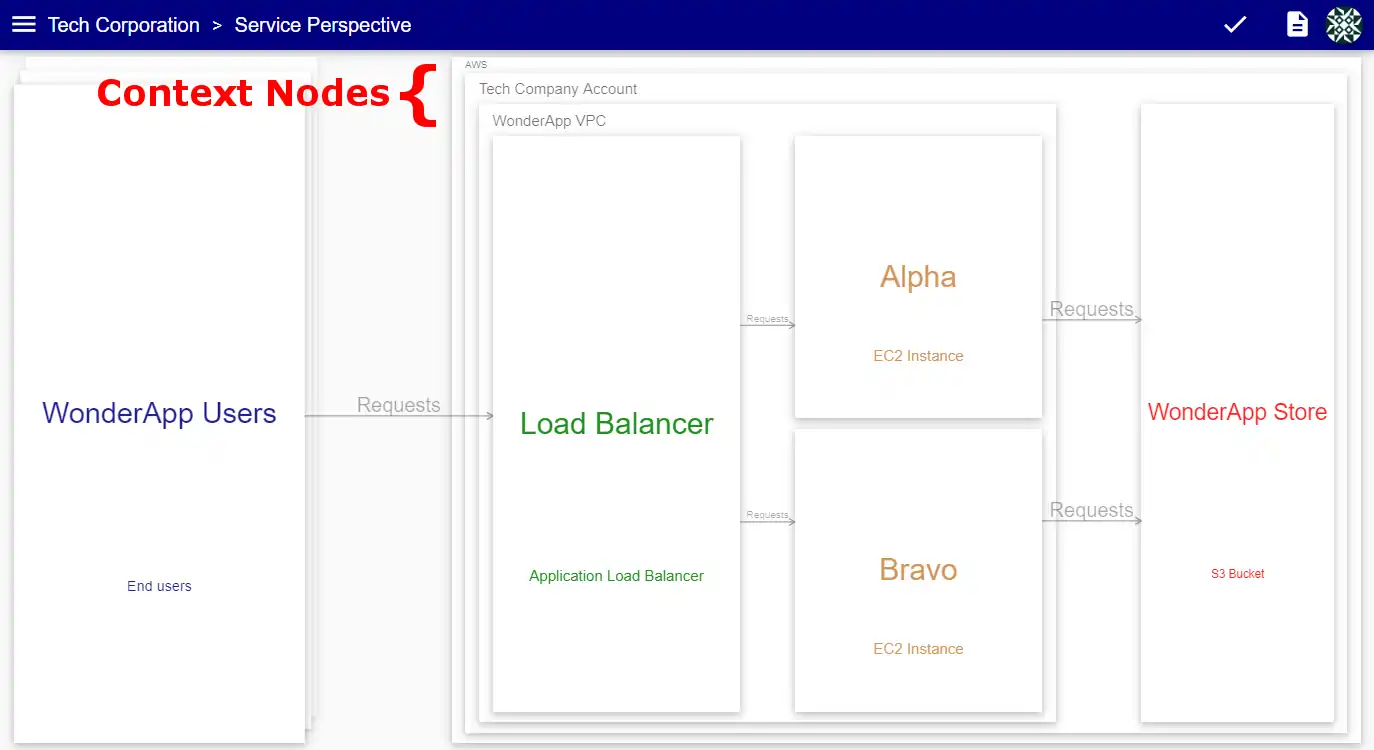
Note that the context nodes (AWS, Tech Company Account, and WonderApp VPC) appear even though they aren’t directly referenced in the relation list (colored above in pink). By default, all perspectives will render context nodes based on the resource hierarchy. We’ll look at how we can override this on a per-perspective basis in a follow-up post.
Resource identification
When defining relations is perspectives, resources are identified by name (except in rare cases when a resource has the id property specified). If two are more resources have the same name, they can be distinguished by specifying their parent(s) using xpath-like expressions. To demonstrate this, let’s add two AWS regions and their availability zones to our resource list:
resources:
...
- name: AWS
  subtitle: Cloud service provider
  children:
    ...
    - name: us-east-1
      subtitle: Region
      color: green
      children:
      - name: AZ1
        subtitle: Availability Zone
        color: darkgreen

      - name: AZ2
        subtitle: Availability Zone
        color: darkgreen

    - name: us-east-2
      subtitle: Region
      color: green
      children:
      - name: AZ1
        subtitle: Availability Zone
        color: darkgreen

      - name: AZ2
        subtitle: Availability Zone
        color: darkgreen
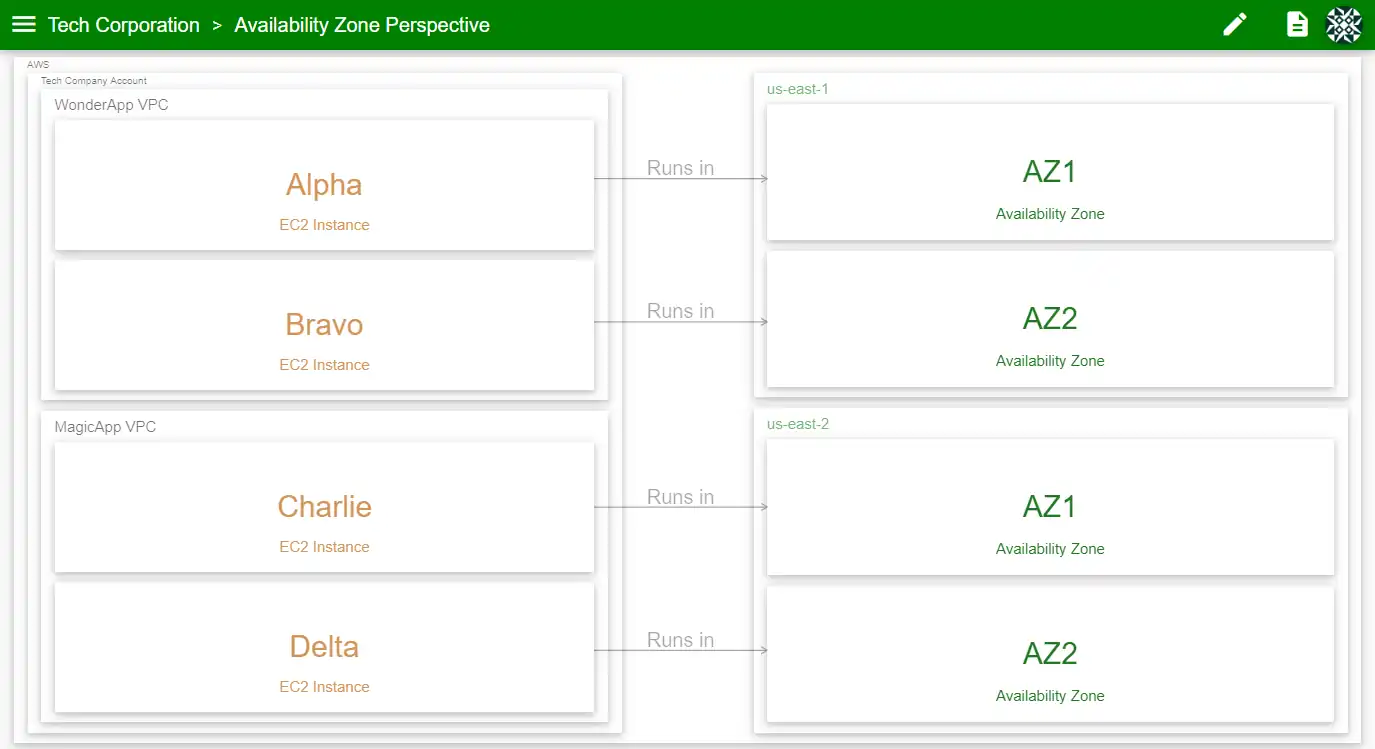
Notice that the AZ1 and AZ2 resources appear twice each; they are identical except for their parent resources (us-east-1 and us-east-2). We’ll create a new perspective (called Availability Zone) and reference these resources:
perspectives:
...
- name: Availability Zone
  color: green
  defaultRelationLabel: Runs in
  relations:
    - from: Alpha
      to: us-east-1/AZ1

    - from: Bravo
      to: us-east-1/AZ2

    - from: Charlie
      to: us-east-2/AZ1

    - from: Delta
      to: us-east-2/AZ2
We’ve distinguished the different availability zones by pre-pending the parent resource, followed by a forward slash. This can be done using as many hierarchy levels as needed. When rendered, this perspective looks like so:
You can play around with this example in the Ilograph app. In (another) follow-up post, we’ll look at how repetition in resource trees can be eliminated by using abstract resources and resource inheritance. Until then, please reach out to me at billy@ilograph.com or @ilographs on twitter.